My Ride K-12
- 4.3
- Rating
- 500.00K
- Installs
- Free
- Price
 Analysis by App-foxy
Getting a child to school on time is one problem; knowing whether the bus is actually on its way is another. My Ride K-12 is an education app from Tyler Technologies, Inc designed around that second problem. I approached it as a parent-facing school transportation tool rather than as a general travel app, and that distinction matters. Its job is not to help me compare public transit routes or plan a weekend journey. Its value depends on whether my child’s school transportation system uses it and whether the information shown matches the way our family handles the school run.
I found the appeal easy to understand: a single place to check transportation information instead of relying entirely on a child’s memory, a paper notice, or a last-minute call. The app is free, rated for Everyone, and available for Android devices running version 8.0 or later. It was released on January 18, 2024, and the current version is 2026.3.27. Those details make it accessible to many families, although the practical experience still depends heavily on the school district’s setup.
How I Would Decide Whether My Ride K-12 Fits
The first question is not whether the interface looks useful. It is whether the school or district has connected its transportation service to My Ride K-12. This is the most important decision criterion because a transportation app cannot create useful route information by itself. If the local school system does not support it, installing the app will not replace the district’s normal notices, transportation office, or school communication channel.
You May Also Like

 Blood Strike: 2.5 Anniversary
Blood Strike’s Loadouts Turn Every Drop Into a Tactical Gamble
A close look at Blood Strike’s custom loadouts: how fast access to signature weapons reshapes its battle royale rhythm, rewards preparation, and narrows the gap between fights.

 Pandora - Music & Podcasts
Pandora’s Music Is Easy to Start, but Harder to Recover
Pandora’s strength is its low-effort path from a seed to a station. Its weak spot is how much confidence it asks you to place in connection, setup, and quiet recovery.

 8 Ball Pool
 Is Built on Rivalries, Rematches, and Routine
A close look at the rivalries, rematches, shared routines, and unanswered safety questions that turn a quick pool match into a persistent mobile community.

 Samsung Music
’s Quiet Strength Is Playing What You Already Own
Its reach comes less from spectacle than from dependable access to a personal library. That simplicity is both the app’s strongest retention engine and its ceiling.

 AccuWeather: Weather Radar
AccuWeather Review: A Quick, Clear Forecast for Everyday Decisions
For everyday plans, the best forecast is the one you can understand quickly. AccuWeather makes rain timing, radar, and local conditions easy to act on, with a few trade-offs.

 Hill Climb Racing
Why Hill Climb Racing Still Turns Crashes Into One More Run
A tiny car, a bumpy hill and one more upgrade: Hill Climb Racing keeps resurfacing because its simple chaos makes every near-miss feel personal.
More From Our News Desk



I would also consider how often I need transportation information. Families with a predictable routine may only need occasional confirmation, especially when a child is learning a new route or when pickup arrangements change. Families managing several children, different schools, or a long commute may get more value from having transportation information available in one dedicated place. In that situation, the app can reduce the number of small decisions that happen during a rushed morning.
Another useful criterion is who actually needs access. A child may be old enough to recognize the bus routine, while a parent still needs to know whether waiting outside is sensible. A caregiver, grandparent, or another adult handling pickup may also need the same transportation context. I would therefore judge the app less by how impressive it feels during a quiet afternoon and more by whether it makes handoffs easier on a busy school day.
The app has a 4.3 average from around 5.1 thousand ratings, with roughly 915 written reviews, and it has passed 500 thousand installs. Those figures suggest that it has reached a meaningful audience, but they should not be treated as a guarantee for every district. School transportation systems can differ considerably, so a positive experience in one area may not translate perfectly to another.
The morning test is more important than the first launch
When I assess an app like this, I care about the moment when I am making breakfast, checking the weather, and trying to get a child out of the door. A useful transportation tool should reduce uncertainty without requiring a long investigation. I would set it up before the first urgent morning, check that the correct student and transportation details appear, and then use it during a normal school week rather than judging it from one quick opening.
That preparation is also where I would look for friction. If the school has supplied an account process, I would keep those details somewhere secure and make sure another trusted caregiver knows the basic routine. I would not wait until a bus is late to discover that the app needs an initial setup step, a school selection, or information that only the district can provide.
A practical tip is to compare what the app shows with the family’s existing school communication during the first few days. This is not because one source must automatically be trusted over the other. It is because the comparison helps reveal how the district uses the service. Some families may see it as their main transportation reference, while others may still need to rely on school messages for cancellations, special schedules, or unusual changes. Understanding that division prevents overreliance on a single screen.
What makes it more useful than a basic reminder
The strongest idea behind My Ride K-12 is that transportation information belongs in a school-specific context. A calendar reminder can tell me that a child should leave home at a certain time, but it cannot necessarily reflect the transportation arrangement that the school has assigned. A generic map can show roads and public transit, but it is not designed around the daily relationship between a student, a school, and a bus service.
That difference becomes important when a family’s routine changes. If a child is starting at a new school, moving between households, or being collected by different adults on different days, a dedicated school transportation app can be easier to consult than a collection of handwritten notes. I would still confirm any major change through the school’s official process, but the app can serve as a practical reference point between those conversations.
There is also a less obvious benefit for children who are becoming more independent. Rather than asking a parent the same timing question every morning, an older child may be able to check the relevant transportation information with supervision. That does not mean the app should replace adult judgment, especially for younger children or changing conditions. It does mean the tool can support a gradual shift from total parental coordination toward a shared routine.
Where the app wins against familiar alternatives
Compared with paper notices, My Ride K-12 is easier to consult when the family is away from the refrigerator or notice board. Compared with text messages, it offers a dedicated place for transportation rather than forcing me to search through unrelated conversations. Compared with a general calendar, it is more closely tied to the school transportation task instead of merely storing a manually entered reminder.
Those advantages are practical rather than flashy. I would not choose it because it promises to solve every school communication problem. I would choose it when the district supports it and when the family benefits from checking transportation information without calling the school office each time. The app’s free price also removes a common barrier, so the decision is mainly about usefulness and compatibility rather than a subscription calculation.
Its reach is another encouraging sign. Tyler Technologies, Inc is the developer, and the app’s presence on a large number of devices indicates that it is not an obscure personal experiment. Still, popularity does not eliminate the need to test the local experience. For a school transportation product, district participation and the quality of local information matter more to me than a large installation figure.
Where Other Options May Fit Better
My Ride K-12 is not automatically the best choice for every transportation situation. If I am planning a trip on a city bus, train, or rideshare service, I would use an app made for public transit or navigation instead. Those tools are built around route planning and general travel, while this app is aimed at school transportation. Trying to use a school-focused app for unrelated journeys would be the wrong match.
It may also be less useful for a family whose school communicates every transportation change through another established channel and whose daily route is completely predictable. In that case, adding another app could create more checking rather than less. I would only keep it if it gives me information or reassurance that the existing method does not provide. A tool is not helpful merely because it is available.
Families who need detailed planning across several forms of transport may prefer a broader navigation service. For example, a parent combining a child’s school bus with walking, cycling, a train, and an evening activity may want one map-based planner for the entire journey. My Ride K-12 is more focused, which is a strength for school transportation but a limitation for complex door-to-door planning.
There is a similar trade-off for households that need a shared family schedule above all else. A calendar can combine school, appointments, sports, medication reminders, and work commitments in one view. My Ride K-12 is not a replacement for that wider organization system. I see it as a specialist tool that can sit beside a calendar, not as the family’s complete planning center.
The main limitation is dependence on local use
The biggest weakness is structural: the app’s usefulness is tied to the transportation service behind it. A beautifully designed screen cannot compensate for incomplete, delayed, or locally unavailable information. This is why I would avoid promising a child that the app will always settle a transportation question. Weather, school decisions, driver circumstances, and district procedures can still require an official message or direct confirmation.
That dependence also affects the installation decision. A parent may download the app expecting instant answers, only to discover that the school’s setup process determines what can be seen. I would treat the first setup as a verification stage: confirm that the correct school context is present, check that the intended caregiver can use the information, and learn which situations still require contacting the school.
Another point of friction is attention. Notifications and routine checks can be helpful, but too many transportation checks can make a family more anxious rather than more prepared. I would establish a simple habit, such as checking before the morning departure and again when a pickup change matters, instead of repeatedly refreshing throughout the day. The goal is dependable coordination, not constant monitoring.
A realistic school-day scenario
Imagine a weekday when one parent has to leave for work before the child normally boards the bus. A grandparent is handling the morning, but the routine is unfamiliar. The parent can use My Ride K-12 as a shared reference before leaving, explain the expected transportation arrangement, and avoid relying on a hurried handwritten note. The grandparent still watches the child and follows the school’s instructions, but the app gives both adults a common starting point.
Later that week, the child is staying with the other parent. This is where a dedicated transportation tool may be more useful than a memory-based routine. The adult receiving the child can review the relevant information rather than assuming that the usual departure details apply. I would still confirm any permanent address or route change with the school, because an app check should not be confused with an official enrollment update.
This scenario also shows the app’s limits. If the school sends a special announcement about an early dismissal or a cancellation, I would read that announcement directly and follow its instructions. My Ride K-12 can support the routine, but it should not become an excuse to ignore broader school communication.
What switching really costs
Because the app is free, the financial cost of trying it is low. The real cost is time and habit. I would need to install it, complete the school-specific setup, learn where the useful information appears, and decide who in the family should check it. That is a small investment when transportation uncertainty is a regular source of stress, but it may feel unnecessary for a family with a perfectly stable routine.
There is also a coordination cost when switching from paper or messages. If one caregiver uses the app while another continues using an old note, the family may end up with two competing routines. I would avoid that by agreeing on which source is used for everyday transportation checks and which source is used for official exceptions. The best result comes from simplifying the process, not simply adding another place to look.
For a child moving from one school or district to another, I would expect the setup to deserve another review rather than assuming the old arrangement carries over. A transportation app is closely connected to the school context, so changes in enrollment, address, or route should be treated carefully. This is one of the less obvious trade-offs: convenience is highest when the information is current, but keeping it current may involve the school’s own procedures.
On Android, the minimum operating system requirement of 8.0 makes the app viable for many older devices, though anyone using an especially old phone should check compatibility before planning around it. Since it is free and intended for Everyone, I see it as a low-risk trial for a supported family. I would not, however, buy a new phone solely for this app or make it the only backup for a child’s transportation.
Who should use it and who should skip it
I would recommend trying My Ride K-12 to parents and caregivers whose school district actively uses it, especially when they need a clearer routine for checking school transportation. It is also a sensible option for families sharing pickup responsibilities, households with changing morning duties, and parents who want their older children to participate more responsibly in the school commute.
I would be more cautious for families whose school does not support the service, whose transportation information is already simple and reliable, or whose main need is planning a mixed public-transit journey. In those cases, a district communication channel, a general calendar, or a navigation app may be a better fit. Installing a specialist tool without a local need is unlikely to improve the routine.
My final recommendation is positive but conditional. My Ride K-12 is worth trying when it matches your school’s transportation system. Its free access, focused purpose, and school-specific role make it more useful than generic reminders for the right household. I would use it as a practical daily reference, keep official school messages in the loop, and test it during ordinary mornings before depending on it during a disruption. For families in that situation, it can turn an uncertain bus routine into a more manageable part of the school day.
After spending time looking at it as a decision rather than just an installation, I see its strongest quality in its focus. It does not try to be a universal travel planner or a complete family organizer. It concentrates on the question many caregivers ask before school: what should we expect from today’s transportation routine? When the local system supports that question well, the app earns a place on the phone. When it does not, choosing a better-matched alternative is the more sensible decision.
FAQs for My Ride K-12
01What is My Ride K-12, and what is it used for?
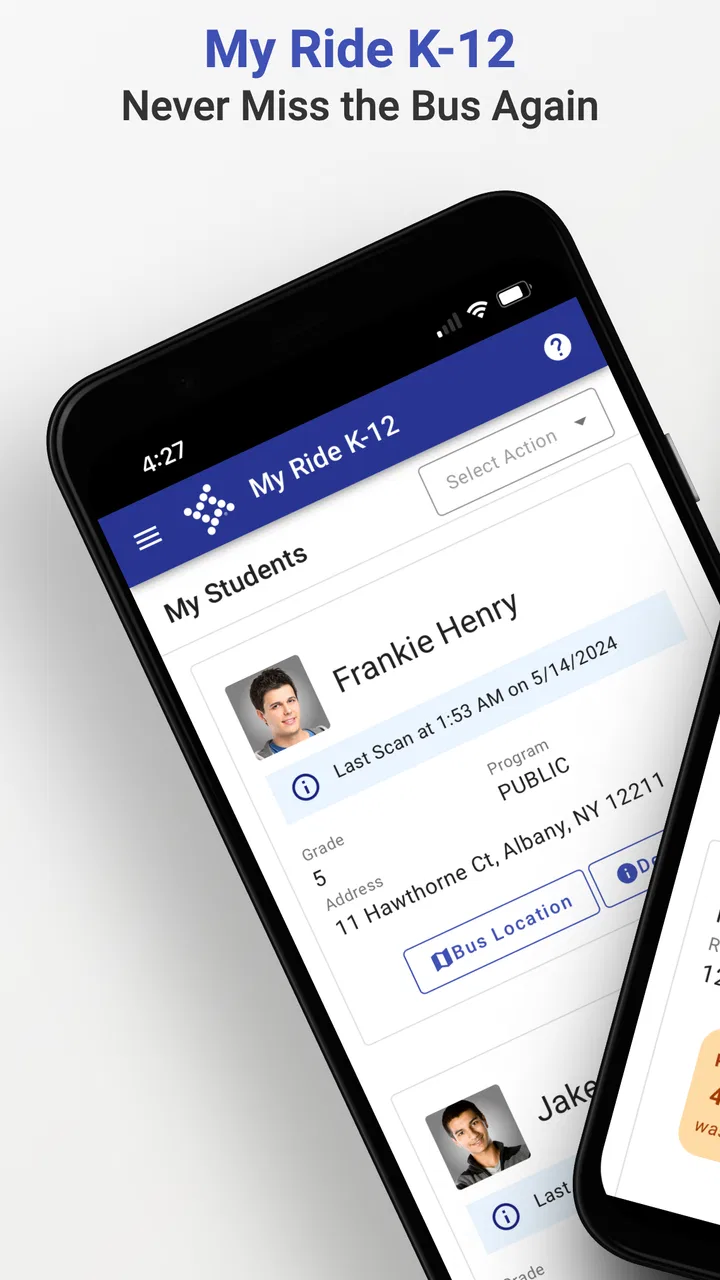
My Ride K-12 is a school transportation app designed to help families manage student bus information from a mobile device. Depending on the school district’s setup, parents and guardians may be able to view assigned routes, bus stops, pickup and drop-off details, transportation alerts, and estimated vehicle locations. The available features can vary by district, so the app is most useful when the local school transportation department officially supports it.
02How do I sign in to My Ride K-12?
To use My Ride K-12, you generally need to select your school district or transportation provider and sign in with the credentials connected to your student or parent account. Some districts may require registration through their transportation office before the app can display information. If your child does not appear after signing in, check that the student details are correct and contact the school district rather than creating multiple accounts.
03Can I track my child’s school bus in real time?
My Ride K-12 may provide live or near-real-time bus location information, but this depends on the equipment installed on the vehicle and the services enabled by your school district. Tracking can sometimes be affected by GPS coverage, mobile connectivity, route changes, or delays in reporting. The map should be treated as a helpful estimate, not a guarantee of the bus’s exact arrival time.
04Does My Ride K-12 send notifications about delays and route changes?
In supported districts, the app can provide transportation notifications such as delays, cancellations, stop changes, route updates, or other important announcements. You may need to enable push notifications on your phone and select the relevant student or route inside the app. Because alerts are controlled by the school transportation department, not every district sends the same types of messages or updates them at the same frequency.
05Is My Ride K-12 free, and is it available for every school district?
The app is typically available to families without a separate download charge, although access depends on whether the school district uses the My Ride K-12 transportation platform. Installing the app alone does not guarantee that route or student information will be available. Before downloading, confirm with your school or transportation department that the service is supported and ask which login details and features are provided.
Pros
- Real-time bus tracking helps families monitor routes and arrival times.
- Push notifications can alert parents about delays
- changes
- or cancellations.
- Route details make it easier to confirm assigned stops and schedules.
- Useful for improving communication between schools
- drivers
- and families.
- Available on mobile devices for convenient access while traveling.
Cons
- Tracking accuracy may vary with GPS coverage and the driver’s device.
- Features depend on the school district’s setup and enabled services.
- Some users may receive too many notifications without careful settings.
- Route information can become outdated when schedules change unexpectedly.
- Account or student verification may be required before using key features.

My Ride K-12
Gallery